Do more with the NHS App! Order repeat prescriptions, use eConsult, view your health record, get reminders and more! Watch the video on our NHS App info page
Prescription requests are no longer accepted by phone. Please use the NHS App or online services, or drop your repeat slip at the practice.

Patient News
You can help to look after a family member or someone else you care for by switching to their profile on the NHS app.
You will need to ask your GP to give you access to do this.
Scroll down to the bottom of the homepage and select switch profile.
Once your GP has set you up with a link profile you will see it here and you will see what services you can use for this person such as order repeat prescriptions for them.
Once you are ready to return to your own profile select switch back to your profile in the yellow banner at the top.
If you need help visit www.nhs.uk/nhs-app/.
You can help to look after a family member or someone else you care for by switching to their profile on the NHS app.
You will need to ask your GP to give you access to do this.
Scroll down to the bottom of the homepage and select switch profile.
Once your GP has set you up with a link profile you will see it here and you will see what services you can use for this person such as order repeat prescriptions for them.
Once you are ready to return to your own profile select switch back to your profile in the yellow banner at the top.
If you need help visit www.nhs.uk/nhs-app/.
You can use the NHS app to contact your GP surgery. Not all GP surgeries offer this service you may be able to request a fit note or ask for an update on test results.
Select the services icon on the homepage.
Select contact your GP about a document or update.
You'll see a screen with details about the service provider press continue and you'll be able to make your request.
If you need help visit www.nhs.uk/nhs-app.
You can use the NHS app to contact your GP surgery. Not all GP surgeries offer this service you may be able to request a fit note or ask for an update on test results.
Select the services icon on the homepage.
Select contact your GP about a document or update.
You'll see a screen with details about the service provider press continue and you'll be able to make your request.
If you need help visit www.nhs.uk/nhs-app.
You can use the NHS app to contact your GP surgery about a health problem.
Not all GP surgeries offer this service.
You can describe your symptoms and then you will hear back from your surgery.
Select the services icon on the homepage select contact your GP about a health problem.
You'll see a screen with details about the service provider.
Press continue and you'll be able to describe your symptoms and send the message to your surgery.
If you need help visit www.nhs.uk/nhs-app.
You can use the NHS app to contact your GP surgery about a health problem.
Not all GP surgeries offer this service.
You can describe your symptoms and then you will hear back from your surgery.
Select the services icon on the homepage select contact your GP about a health problem.
You'll see a screen with details about the service provider.
Press continue and you'll be able to describe your symptoms and send the message to your surgery.
If you need help visit www.nhs.uk/nhs-app.
In the NHS app, you can see messages from your health care providers to make sure you get a notification when you have received a new message in your inbox.
Your notification settings need to be turned on in your phone.
To do this, go to your account and select Settings.
Then select Manage Notifications.
Select go to Device Settings.
Select Allow notifications.
Once you've enabled notifications on your device, you need to reopen the NHS app.
Doing this confirms that you have registered to receive notifications.
For more information, go to nhs.uk/nhs app.
In the NHS app, you can see messages from your health care providers to make sure you get a notification when you have received a new message in your inbox.
Your notification settings need to be turned on in your phone.
To do this, go to your account and select Settings.
Then select Manage Notifications.
Select go to Device Settings.
Select Allow notifications.
Once you've enabled notifications on your device, you need to reopen the NHS app.
Doing this confirms that you have registered to receive notifications.
For more information, go to nhs.uk/nhs app.
On the services page of the NHS app you can order a repeat prescription, check for available GP appointments, use 111 online find NHS services near you and search for trusted NHS health information.
Some of these services depend on your GP surgery so you may not see all of these links.
If you need help you can visit www.nhs.uk/nhs-app/.
On the services page of the NHS app you can order a repeat prescription, check for available GP appointments, use 111 online find NHS services near you and search for trusted NHS health information.
Some of these services depend on your GP surgery so you may not see all of these links.
If you need help you can visit www.nhs.uk/nhs-app/.
Use 111 online on the NHS app to check if you need medical help right now.
You'll be asked to agree to give certain information with the online service.
Check you are happy with the details.
Select start to use 111 online.
Read the checklist and confirm you don't need to call 999.
111 online does not know your health record so you may need to give this information from here you can use 111 online.
If you need help visit www.nhs.uk/nhs-app.
Use 111 online on the NHS app to check if you need medical help right now.
You'll be asked to agree to give certain information with the online service.
Check you are happy with the details.
Select start to use 111 online.
Read the checklist and confirm you don't need to call 999.
111 online does not know your health record so you may need to give this information from here you can use 111 online.
If you need help visit www.nhs.uk/nhs-app.
You can use the NHS app to see your GP health record.
You can see information about your medicines health conditions and your test results.
You will see a warning message saying your health record may contain sensitive information.
Select continue if you're happy to see your GP health record.
You will then see information about your health conditions: medicines, test results and documents.
If you need help visit www.nhs.uk/nhs-app.
You can use the NHS app to see your GP health record.
You can see information about your medicines health conditions and your test results.
You will see a warning message saying your health record may contain sensitive information.
Select continue if you're happy to see your GP health record.
You will then see information about your health conditions: medicines, test results and documents.
If you need help visit www.nhs.uk/nhs-app.
You can order your repeat prescription on the NHS app.
On the homepage select request repeat prescriptions.
You will see or can change your nominated pharmacy then select continue.
You will see your medicines select what you need.
Then select continue.
If you're happy with the details select request prescriptions.
Your prescription has now been requested.
You can find out what to do next, see the status of your request and see that the medicine you requested is waiting for approval.
If you need help you can visit www.nhs.uk/nhs-app/.
You can order your repeat prescription on the NHS app.
On the homepage select request repeat prescriptions.
You will see or can change your nominated pharmacy then select continue.
You will see your medicines select what you need.
Then select continue.
If you're happy with the details select request prescriptions.
Your prescription has now been requested.
You can find out what to do next, see the status of your request and see that the medicine you requested is waiting for approval.
If you need help you can visit www.nhs.uk/nhs-app/.
The NHS App helps you to get well, stay well and manage your health care
Its a simple and secure way to:
- order repeat prescriptions
- find NHS services
- view your GP health record
- get reminders and messages
- and much more …
It's free and available 24 hours a day, 7 days a week.
How and where to download the NHS App
NHS App for iPhone and Apple devices
NHS App for Android phones and devices
NHS App walk through videos
These videos show you how to navigate the NHS App and use its services. Each video has a voice over and captions on screen.
How to order your repeat prescriptions on the NHS App
How to see your GP health record on the NHS App
How to find services near you on the NHS App
How to see NHS App messages and notifications
How to contact your GP surgery about a health problem on the NHS App
The NHS App helps you to get well, stay well and manage your health care
Its a simple and secure way to:
- order repeat prescriptions
- find NHS services
- view your GP health record
- get reminders and messages
- and much more …
It's free and available 24 hours a day, 7 days a week.
How and where to download the NHS App
NHS App for iPhone and Apple devices
NHS App for Android phones and devices
NHS App walk through videos
These videos show you how to navigate the NHS App and use its services. Each video has a voice over and captions on screen.
How to order your repeat prescriptions on the NHS App
How to see your GP health record on the NHS App
How to find services near you on the NHS App
How to see NHS App messages and notifications
How to contact your GP surgery about a health problem on the NHS App
Worried your child is ill - visit the NHS Healthier Together website for advice on a large range of topics from pregnancy and birth, covering all ages up to young person.
Please visit - https://nenc-healthiertogether.nhs.uk/
Worried your child is ill - visit the NHS Healthier Together website for advice on a large range of topics from pregnancy and birth, covering all ages up to young person.
Please visit - https://nenc-healthiertogether.nhs.uk/
Dear Patient,
We would like to inform you about upcoming national changes to the availability of Mounjaro (Tirzepatide), which will come into effect from 23rd June 2025. Under the new guidance, access to Mounjaro will be extremely limited and restricted to a small number of patients who meet specific eligibility criteria.
At this time, we are awaiting further direction from the North East and North Cumbria Integrated Care Board (ICB) regarding local implementation and next steps. For the most up-to-date information, please visit the ICB’s official website:
🔗 Weight Loss Drugs – Information for Patients
Please note the following important points:
• Eligibility criteria for Mounjaro are strict and nationally defined.
• The practice will review patient records and will contact you directly if you are eligible under the new criteria.
• We kindly ask that you do not book an appointment or contact the practice to request Mounjaro. We are not permitted to prescribe it outside the approved criteria.
We appreciate your patience and understanding as we await further clarification from the ICB. Thank you for working with us to ensure safe and appropriate care.
Dear Patient,
We would like to inform you about upcoming national changes to the availability of Mounjaro (Tirzepatide), which will come into effect from 23rd June 2025. Under the new guidance, access to Mounjaro will be extremely limited and restricted to a small number of patients who meet specific eligibility criteria.
At this time, we are awaiting further direction from the North East and North Cumbria Integrated Care Board (ICB) regarding local implementation and next steps. For the most up-to-date information, please visit the ICB’s official website:
🔗 Weight Loss Drugs – Information for Patients
Please note the following important points:
• Eligibility criteria for Mounjaro are strict and nationally defined.
• The practice will review patient records and will contact you directly if you are eligible under the new criteria.
• We kindly ask that you do not book an appointment or contact the practice to request Mounjaro. We are not permitted to prescribe it outside the approved criteria.
We appreciate your patience and understanding as we await further clarification from the ICB. Thank you for working with us to ensure safe and appropriate care.
For an easy way to request repeat prescriptions, check your test results and read messages from the NHS use the NHS App
For more information on how to use the NHS App, please visit https://www.nhs.uk/nhs-app/about-the-nhs-app/
To download visit either the App Store https://apps.apple.com/us/app/nhs-app/id1388411277
or Google Play https://play.google.com/store/apps/details?id=com.nhs.online.nhsonline
Please turn on notifications in settings to receive messages from your GP direct to your portal
For an easy way to request repeat prescriptions, check your test results and read messages from the NHS use the NHS App
For more information on how to use the NHS App, please visit https://www.nhs.uk/nhs-app/about-the-nhs-app/
To download visit either the App Store https://apps.apple.com/us/app/nhs-app/id1388411277
or Google Play https://play.google.com/store/apps/details?id=com.nhs.online.nhsonline
Please turn on notifications in settings to receive messages from your GP direct to your portal
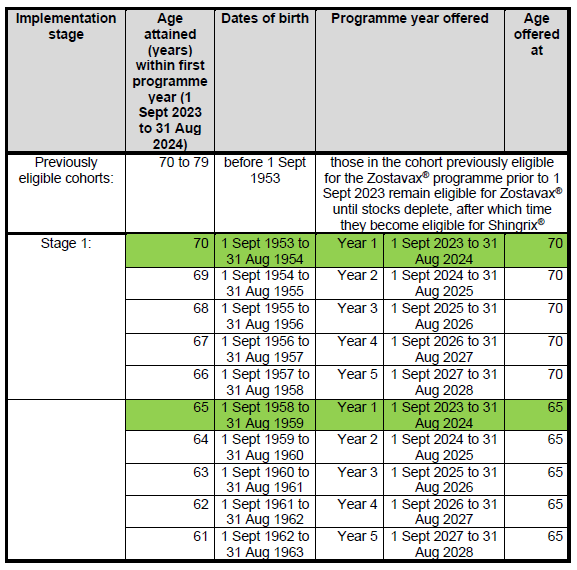
Shingles - Please check the list below to see if or when you are eligible. Please visit NHS.UK for more information about the Shingles Vaccine
Pneumococcal - Click here to access the Pneumo Aware website, which provides information about pneumococcal disease and the national immunisation programme to members of the public at risk. Also visit NHS.UK for more information.
HPV - Please click here to access the HPV Wise website, which provides information about HPV related cancers. Also please visit NHS.UK for more information.
Shingles - Please check the list below to see if or when you are eligible. Please visit NHS.UK for more information about the Shingles Vaccine
Pneumococcal - Click here to access the Pneumo Aware website, which provides information about pneumococcal disease and the national immunisation programme to members of the public at risk. Also visit NHS.UK for more information.
HPV - Please click here to access the HPV Wise website, which provides information about HPV related cancers. Also please visit NHS.UK for more information.
How your health information improves lives
Your health and care records help us care for you. They also have the power to unlock new treatments, medicines and devices.
Did you know?
Lots of different places hold parts of your health and care record. GP, hospitals, mental health, voluntary and social care services can all hold a piece.
This information helps healthcare workers care for you. But it can also help researchers make new discoveries. When we can link lots of records together it helps us spot patterns. This knowledge can improve the health of people who live nearby and future generations.
Research
Your GP practice and the NHS use your information to provide your care. Sometimes, confidential patient information is also used to support research, planning and improvement of NHS services. You have a choice about whether your confidential patient information is used for purposes beyond your individual care.
You can set or change your national data opt-out preference at any time by visiting the NHS “Your Data Matters” page: https://www.nhs.uk/your-nhs-data-matters
You can also find more information about opting out here: https://www.nhs.uk/using-the-nhs/about-the-nhs/opt-out-of-sharing-your-health-records/
If you wish to stop your GP practice sharing your data for research and planning before it leaves the practice, you can request a Type 1 opt-out directly with the practice. Your data will continue to be used for your individual care.
How your health information improves lives
Your health and care records help us care for you. They also have the power to unlock new treatments, medicines and devices.
Did you know?
Lots of different places hold parts of your health and care record. GP, hospitals, mental health, voluntary and social care services can all hold a piece.
This information helps healthcare workers care for you. But it can also help researchers make new discoveries. When we can link lots of records together it helps us spot patterns. This knowledge can improve the health of people who live nearby and future generations.
Research
Your GP practice and the NHS use your information to provide your care. Sometimes, confidential patient information is also used to support research, planning and improvement of NHS services. You have a choice about whether your confidential patient information is used for purposes beyond your individual care.
You can set or change your national data opt-out preference at any time by visiting the NHS “Your Data Matters” page: https://www.nhs.uk/your-nhs-data-matters
You can also find more information about opting out here: https://www.nhs.uk/using-the-nhs/about-the-nhs/opt-out-of-sharing-your-health-records/
If you wish to stop your GP practice sharing your data for research and planning before it leaves the practice, you can request a Type 1 opt-out directly with the practice. Your data will continue to be used for your individual care.